How to Get More WooCommerce Product Reviews on Autopilot
A product with five reviews sells 270% better than the same product with none. Here's the complete playbook for WooCommerce review automation.
Janine Große-Beck · September 22, 2026
Think about your own shopping habits. Before you buy anything online, you likely skip the shiny marketing description and scroll straight to the reviews. Why? Because the description is a pitch. The reviews are proof.
Your customers are doing the exact same thing on your store right now. If they find an empty review section, they hesitate.
Northwestern University's Spiegel Research Center analyzed data across 100,000+ products and found that a product with just five reviews is 270% more likely to be purchased than one with none. The magic happens early: going from zero to five reviews gives you a massive conversion spike, while going from 50 to 55 barely moves the needle.
This means bridging the gap between zero and five reviews is the single fastest, cheapest way to boost your sales.
According to PowerReviews, up to 80% of all online reviews come directly from post-purchase emails. Customers rarely log back into a site to leave a review spontaneously. They do it because they were asked.
The good news? You don't have to chase them manually. Below are three automated workflows you can build today to get reviews on autopilot, plus the copy that makes them convert.
When to Send a Review Request Email
The most common mistake with review emails is the wrong timing. It's incredibly easy to set your automation to trigger the moment an order hits "Completed". But in the real world, "Completed" usually just means your team boxed the item up and handed it to the courier. Your customer ends up getting a "How did you like your new candle?" email while the candle is literally in the back of a delivery van.
Even if the package did arrive, a box sitting on a doorstep isn't an opinion. Someone who has owned your coffee blend or skincare cream for six hours has absolutely nothing useful to say about it yet.
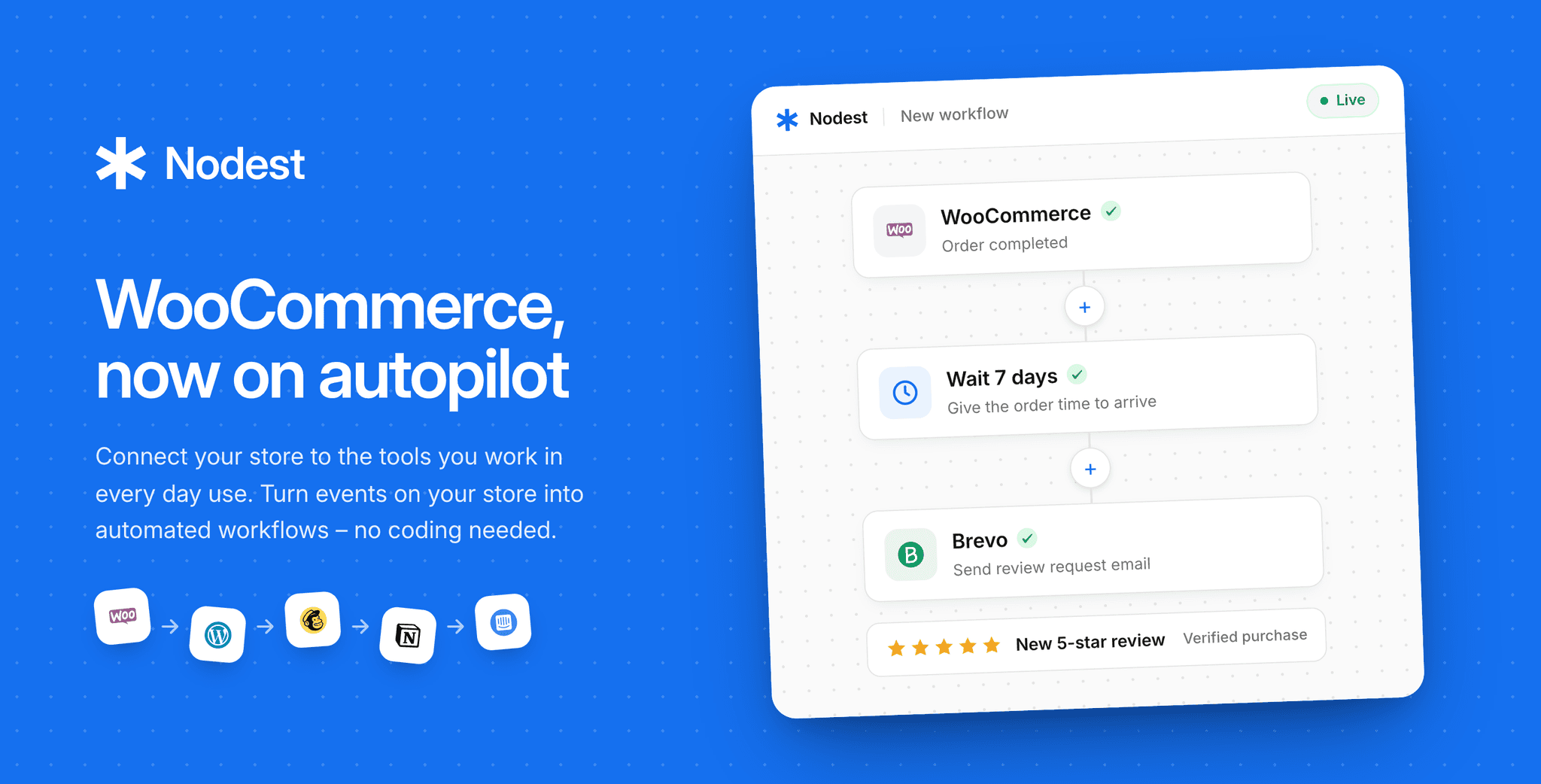
So the automation needs a few guardrails before it sends anything. This is a four-step chain:
- Trigger: Order status changes to Completed in WooCommerce.
- Delay: Wait a set number of days based on what the customer bought.
- Filter: Right before sending, check that the order hasn't been refunded and the product hasn't already been reviewed. If either is true, the automation stops here.
- Action: Send a single, highly specific email asking one question.
That delay is the most important step in this entire system. Typical review request response rates hover around 5% to 10%. Stores that nail the timing report multiples of that. It's the exact same email, but it arrives when the customer actually has something to say.
The ideal wait time depends entirely on what you sell:
- Digital downloads or course access: Wait 3–5 days. They either opened it immediately or they never will.
- Consumables like coffee or cosmetics: Wait 10–14 days, then they've used it several times, but still remember buying it.
- Apparel: Wait 10–14 days to give them enough time to wear it once and wash it once.
- Furniture or anything assembled: Wait 14–21 days to let the initial "assembly rage" subside first.
- Supplements or deep skincare: Wait 30–45 days, if your whole marketing claim is "does it work"? Give them real time to see results.
- Hardware and high-consideration items: Wait 21–30 days until they're past the honeymoon phase and into honest, daily usage.
If your shipping carrier passes delivery data back to WooCommerce, set the delay to count from the actual delivery date. If it doesn't, take your average shipping transit time, add two days for buffer, and count from the "Completed" date.
Once the basic version is running, you can customize the delay in a dozen directions: different waits per category, a longer one for high-ticket orders, or a shorter one for repeat customers who already know your brand inside and out.
How to Follow Up on a Review Request (and When to Stop)
Sending just one email leaves reviews on the table. Data from PowerReviews shows a generational split: roughly 74% of Baby Boomers will write a review on the first ask, but that drops to around 60% for Gen Z and Millennials. If your customer base is younger, a single email means you're leaving a big amount of social proof behind.
The fix is a follow up that picks up where the first one left off. In Nodest, it's three steps:
- Delay: Wait 5 to 7 days after the first email went out.
- Filter: Check whether they've left a review yet. If they have, the automation stops and they never get pestered.
- Action: If they haven't, send one final email that's completely different from the first. Then stop.
The second ask should never be a nagging "Reminder: Please review your purchase". Nobody wants another chore added to their inbox. Instead, ask a single, highly specific question, like "Would you buy the Ethiopia Guji coffee again?" and link them straight to the review form. A direct question gets answered. An automated reminder gets deleted.
Two emails is the hard limit. A third won't get you more reviews. It'll just get you unsubscribes and spam complaints.
How to Write a Review Request Email That Gets Replies
Writing the copy for your email is mostly about what you choose to leave out. Keep your emails clean, conversational, and direct by following these rules:
- Ask a specific question, don't handover a task. "What did you think of the Ethiopia Guji?" completely beats "Review your recent purchase". One is a natural question from a person, the other feels like a system-generated chore. When the product's whole promise is a result, ask about the result rather than the object. "A month in, is the magnesium helping you sleep?" pulls more replies, because it asks about the exact thing the customer has been waiting to find out.
- Skip the preamble. Your customers do not need a paragraph about how much your small business values feedback. Keep it to two sentences: here's what you bought, and would you mind telling us what you thought? Then drop a big, clear button.
- Use exactly one link. Don't include your review form plus your Instagram plus your new arrivals plus a discount code. Every extra link dilutes clicks and distracts from the goal.
- Link straight to the form, not the product page. Don't make them scroll past your description searching for the reviews tab. Send them straight to a page where the star widget is visible immediately. Every step you remove keeps more people in the pipeline.
- Ask for honesty out loud. Add a line like: "If something wasn't right, just reply to this email and I'll personally sort it out." This does two brilliant jobs at once. It catches an unhappy customer before they vent publicly, and it makes the email feel like a genuine conversation rather than a cold transaction.
That last line is giving you an early warning system to fix customer service issues before they turn into public complaints. Just make sure of one thing: if you invite people to reply, those replies have to land in a monitored inbox or your support desk. The worst thing you can do is invite a complaint and then let it sit somewhere no one is looking.
How to Turn Every Review Into a Sales Asset
Getting reviews is only half the job. What you do with them once they land is the other. A great review can't be reused if no one knows it's there, and an angry one can't be answered if no one sees it in time. The moment a review posts, it should land somewhere a person will actually look, sorted by whether it's good news or a fire to put out.
So instead of treating a review as the finish line, treat it as a trigger for another automation:
- Trigger: A new review is posted on your store.
- Condition: Split the flow based on the rating.
- Action A (4 or 5 stars): Post it to a #wins Slack channel with the text and a link, and tag the customer as an "Advocate" in your CRM. Your strongest reviews now land in front of the people who can put them to use on your website, in an ad or in the next newsletter.
- Action B (1 to 3 stars): Alert #support and open a priority ticket for a named person, due in hours. 66% of consumers expect a reply to a negative review within three days and this is how you beat that clock. A well handled one-star review is actually a massive sales asset. It's public proof to the next hesitant customer that there's a real human behind the store who cares when things go wrong.
Once you have this core routing down, you can extend it later: Push five-star reviews into a Notion database for your marketing team, auto-draft replies to your approval, or send anything about a flagship product to a channel you check by the hour.
Is Review Gating Illegal? Why It Backfires Anyway
Review gating is the trick of screening customers by how happy they are before you let them leave a public review, so only the fans reach your review form. It works by sending everyone an initial email asking "How was your order?" with a happy face and a sad face. Click the happy face, and you're sent straight to the public review page. Click the sad face, and you're funneled to a private customer support inbox instead. If you do this at scale, your product page fills with nothing but five stars, because every unhappy customer got intercepted before they could post a word.
Don't do this. For one thing, it's illegal across both the US and the EU. The FTC strictly prohibits review suppression, meaning you cannot pick and choose which reviews are displayed based on sentiment and the EU's Omnibus Directive treats publishing only positive feedback as a misleading commercial practice. Review gating violates consumer rights. Major platforms like Google will also ban your account if they catch you doing it.
Beyond the legal trouble, review gating actually hurts your sales, which is the part that surprises most store owners. The Spiegel Research Center found that a customer's likelihood to buy peaks when a product rating is in the mid-4s, not at a perfect 5.0. If customers see a flawless, untouched five-star average and immediately assume the reviews are fake or manipulated. Spiegel also found that a verified-buyer badge improves purchase odds by 15%, because the main thing customers are looking for is credibility.
By gating, you're taking on massive legal exposure just to force a rating that actually converts worse than an honest one.
5 Things to Check Before You Automate Review Requests
A few technical edge cases will absolutely bite you if you don't plan for them. Make sure these six are built into your workflow before you switch it on:
- Exclude refunded orders. The worst email you can send is a cheerful "How did you like this product?" four days after a customer returned a broken item in disgust. This is why you check the order status right before the email sends, not just when the order is completed.
- Cap your emails by customer. If a loyal regular orders from you weekly, they should not repeatedly hear from you about reviews. Set a strict rule limiting your automation to a maximum of one review ask per customer every 60 days.
- Check for open support tickets. If a customer is currently talking to your team about a late shipment or a damaged box, stop the review request.
- Pick exactly one product per email. If a customer buys six items, send one email featuring one product. Asking them to review all six feels like a homework assignment and drops your response rate to zero. Pick your highest-value item, or the one with the fewest reviews to fill your thinnest product pages first.
- If you incentivize, reward the act, not the rating. Offering a discount coupon for leaving an honest review is perfectly fine, as long as it's unconditional and clearly disclosed. Offering a discount only for a positive review is illegal.
Get More WooCommerce Reviews on Autopilot
Every honest review you collect is a permanent asset sitting on your product page, working around the clock, and unlike your Google ads account, it compounds. Each one makes the next sale a little easier, and none of them can be copied by a competitor. Most stores treat reviews as something that either happens or doesn't. The ones that win treat them as a system they own and feed on purpose.
That system is simple. Reviews are social proof. The cheapest sales lever you have, is closing the gap between zero and five of them. The winning play is to ask a specific question at the moment the customer actually has an opinion, ask exactly one more time, turn every new review into an automatic action, and never gate. By doing that, you're building honest social proof on autopilot.